
Wishlist alerts
Cascade can email a shopper when something they saved drops in price or comes back in stock, which brings them back at the moment they're most likely to buy.
Turn the alerts on
-
Open Settings → Wishlists.
-
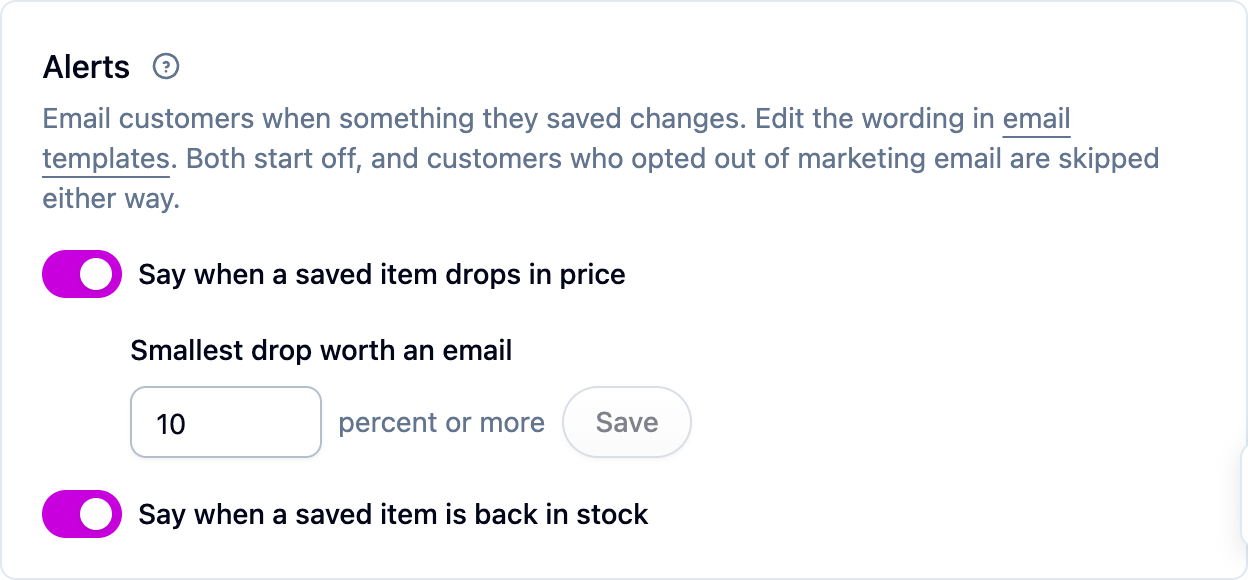
Turn on Say when a saved item drops in price and, if you have a connected store, Say when a saved item is back in stock. Both start off.
-
Set Smallest drop worth an email. It starts at 10 percent: a smaller fall is ignored, so a penny off or a rounding change never becomes an email. Set it lower if you run frequent small promotions, or higher if you'd rather only announce real sales.
-
To change the wording, edit the "Wishlist Price Drop" and "Wishlist Back In Stock" templates under Settings → Email templates. See Email templates.
What gets sent
- Price drop goes out when a saved item's price falls by at least your threshold, compared with the price Cascade held before (not a list or compare-at price).
- Back in stock goes out when a saved item goes from out of stock to available. This needs a store that reports stock, which usually means a connected Shopify store. A variant that Shopify doesn't track, or that keeps selling when it runs out, counts as always available and never triggers an alert.
Both react to a change, not a state. A sync that rewrites the same catalog every hour sends nothing, and a newly imported catalog never emails anybody.
A shopper gets one email listing everything that changed, not one per item. Each item is alerted at most once a week per kind, so a stock level that flickers or a price edited three times in an afternoon still produces a single email. Items the shopper has already bought are left out.
Who doesn't get them
Alerts are marketing email, so a shopper who has unsubscribed is skipped, and every alert carries its own unsubscribe link. Unsubscribing stops all of Cascade's marketing email for that shopper, not just wishlist alerts.
If something isn't working
- No price-drop emails after a sale. Check the drop was at least your threshold, and that the shopper hasn't been alerted about that item in the last week.
- No back-in-stock emails. Cascade has to have known the item was out of stock first. Check the product syncs from a connected store, and that Shopify tracks inventory for that variant.
Next steps
- Sharing and gift purchases.
- Wishlists for the rest of the settings.