
Referrals
A refer-a-friend scheme: a member shares their code, someone new orders with it, and both of them get rewarded. Referrals are part of your loyalty program, so what they pay out is a loyalty rule like any other.
How a referral happens
- Every loyalty member gets a share code and link when they join, shown in the loyalty widget on your storefront.
- A new customer arrives with the code, from the link or by entering it at checkout. As soon as they sign in, the referral is pending and they're enrolled as a referred member, which pays them their welcome reward.
- The new customer places an order. The referral is completed and the referrer is paid.
One live referral per referred customer, so the same person can't be referred twice. Self-referrals and a second account on the referrer's own email address are refused and never show in your numbers. Codes aren't case-sensitive and never contain look-alike characters, so they're easy to read out over the phone.
Set it up
- Name your points under Settings → Loyalty if you haven't. See Loyalty.
- Add the referrer's rule under Loyalty → Rules with the trigger Refers a friend. Optionally require several referrals before it pays (turn on Only pay out every so many referrals; 3 pays on the third, sixth and ninth), set a minimum order size, or give it a deadline.
- Add the friend's welcome reward, usually a discount, as a Joins the program rule with Which sign-ups count set to Referred sign-ups only. Cap it at one per customer.
- Put the loyalty widget on your storefront so members can find their code. See Storefront widgets.
The quickest way to get both rules is Set up loyalty with Refer a friend picked.
Watch referrals
Loyalty → Referrals lists every referral with its status, who referred, who was referred, the code, its source and the date. The source is where it came from: your storefront, a code entered at checkout, or a shared wishlist (open it to find a link to the list). The Source filter picks one kind out.
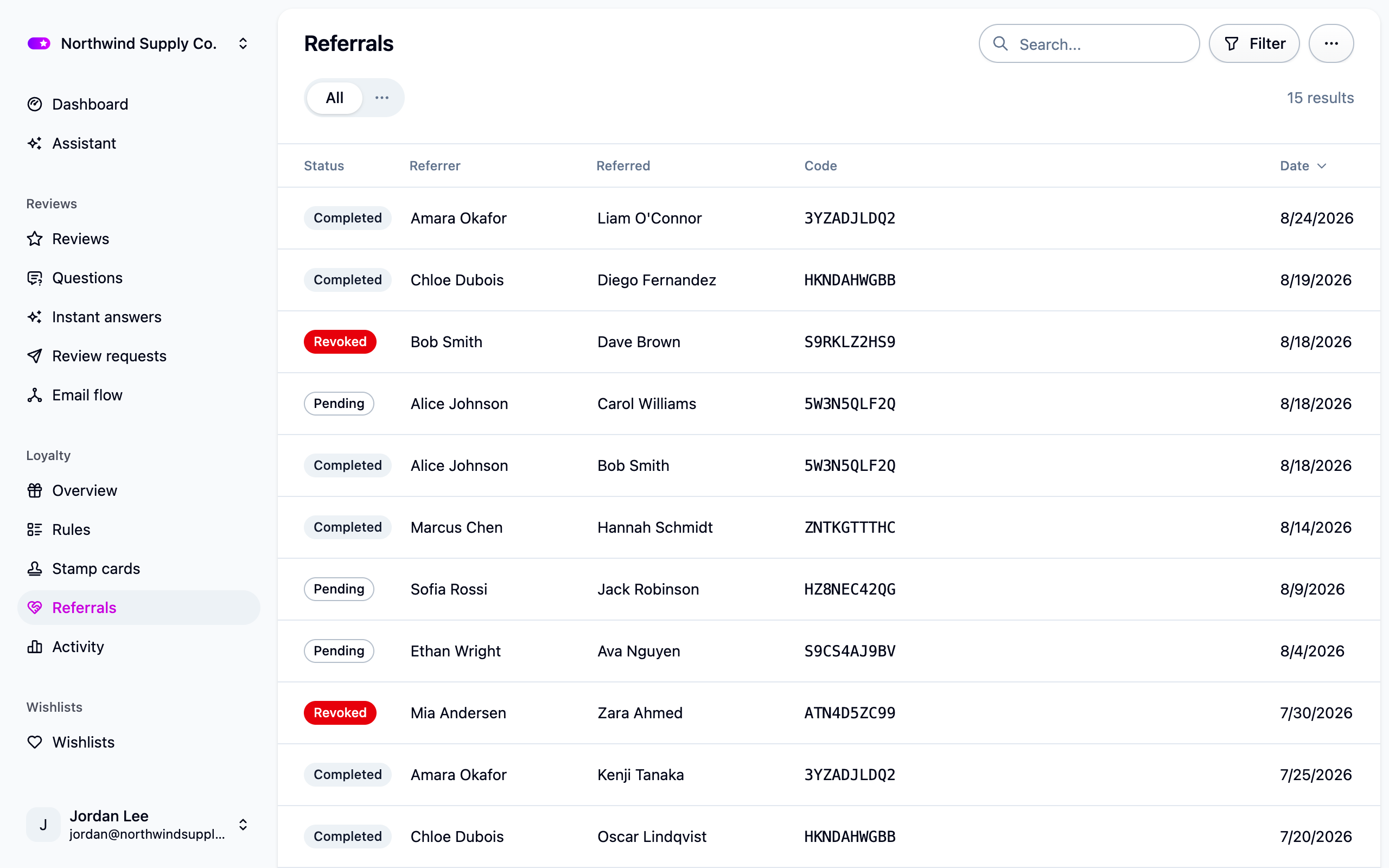
Export writes what's on screen, filters included, to Settings → Exports.
Referrals from shared wishlists
A shared wishlist can be a referral channel too. Turn on Count shared lists as referrals under Settings → Wishlists. It's off to start with, and needs Allow shared wishlists on. From then on:
- A member shares a list, and somebody follows one of its product links.
- When that visitor signs in, the referral is pending with the source Shared wishlist, credited to the list's owner. The owner's code is never shown to anyone: Cascade works the owner out from the link.
- It completes when the visitor orders something that's on the list, in any variant. An order with nothing from the list leaves it pending for a later one, and a list that has since been deleted can't complete at all.
A direct referral, one made with the member's code, still completes on any first order. If the visitor already had a pending referral, the earlier one stands. The list's owner has to be a loyalty member, or nothing is recorded, and turning the setting off or making the list private stops new referrals without touching the ones already recorded.
To pay these differently, set Which referrals count on the Refers a friend rule to Every referral, Direct referrals only or Shared wishlist referrals only. "10 points per direct referral, 5 per wishlist referral" is two rules.
Complete or revoke one by hand
Open a referral under Loyalty → Referrals:
- Complete a pending referral to pay the referrer now. It can't be undone. A rule with a minimum order size never pays on a hand completion, because there's no order to measure.
- Revoke a referral you believe is fraudulent. The referrer isn't paid. Return to pending if you change your mind.
- A completed referral stays completed.
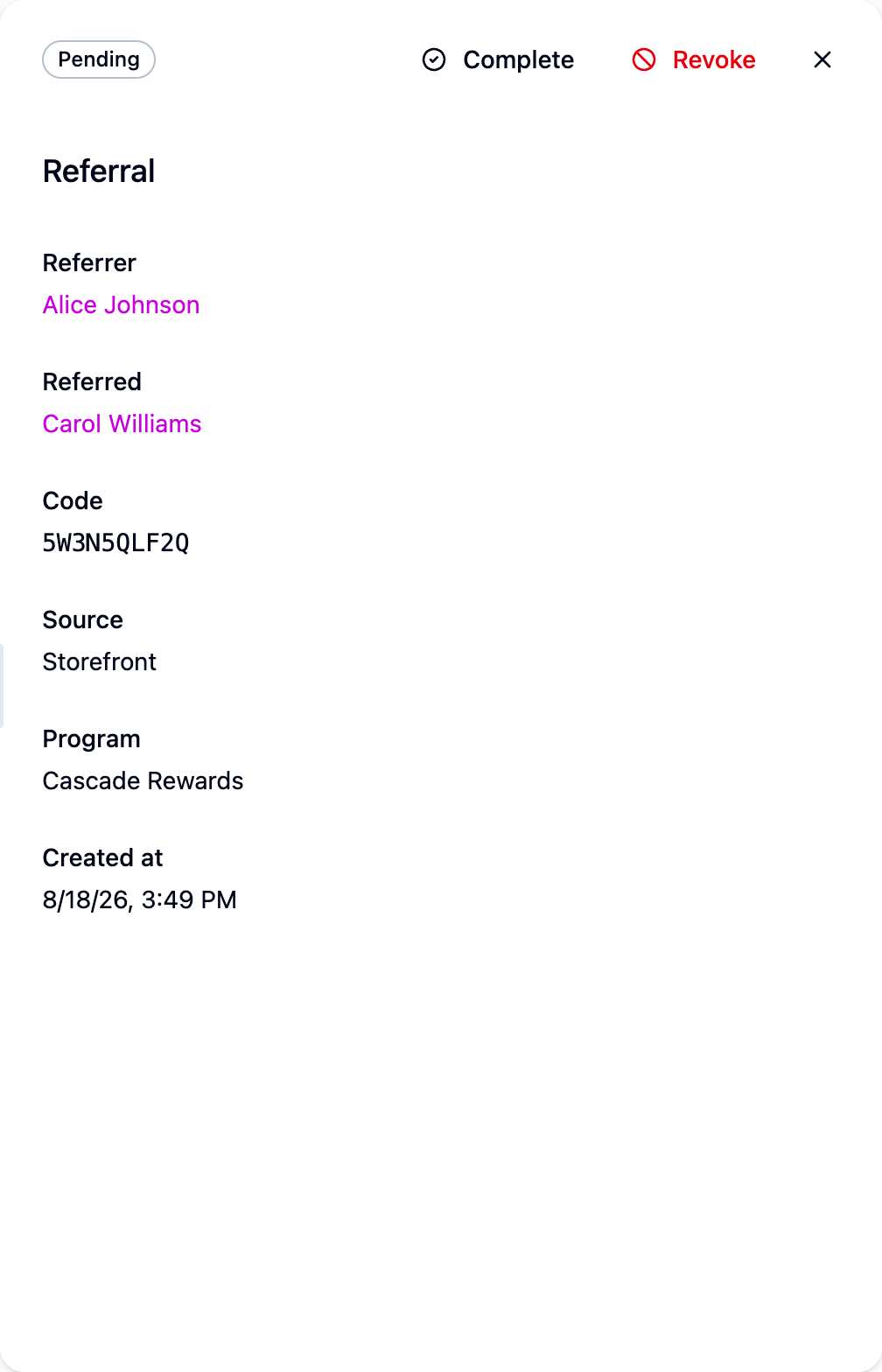
Completed referrals also show in both members' history under Loyalty → Activity.
If referrals aren't completing
- Has the referred customer's order reached Cascade? No order means no completion.
- Is the order under the same program the referral was made in?
- Does the order meet the rule's minimum, or has its deadline passed?
- Do the two customers share an email address? That's a self-referral.
- Is it a shared wishlist referral? It only completes on an order that includes something from that list.
Next steps
- Shape the payouts: Loyalty rules.
- Tell members about their reward: Loyalty emails.
For developers
On a custom storefront, checkout attribution means passing the code your customer entered
at checkout to Cascade; link attribution, from a share link or a shared wishlist's product
link, needs only the widget. Subscribe to
referral.updated to hear about a referral being recorded and later completing. See
Referrals API and Webhooks.